Reawote asset browsers for major 3D softwares
Drop Reawote assets directly into your scene and work faster than ever.
We have just finished developing new Reawote asset browsers for four major 3D applications: Blender, SketchUp, Cinema 4D and 3ds Max.
This update changes the way architects, designers and 3D artists work with Reawote assets. Instead of treating the library as a place where you download files first and organize them later, the new asset browsers bring Reawote directly into your 3D workspace.
The result is a smoother, faster and more natural workflow from asset selection to scene building.

From downloads to direct scene integration
Until now, Reawote plugins allowed users to download assets to their hard drive and then manually import them into a project. That worked, but it still created unnecessary steps between finding the right asset and actually using it in a scene.
With the new Reawote Browsers, that friction is removed.
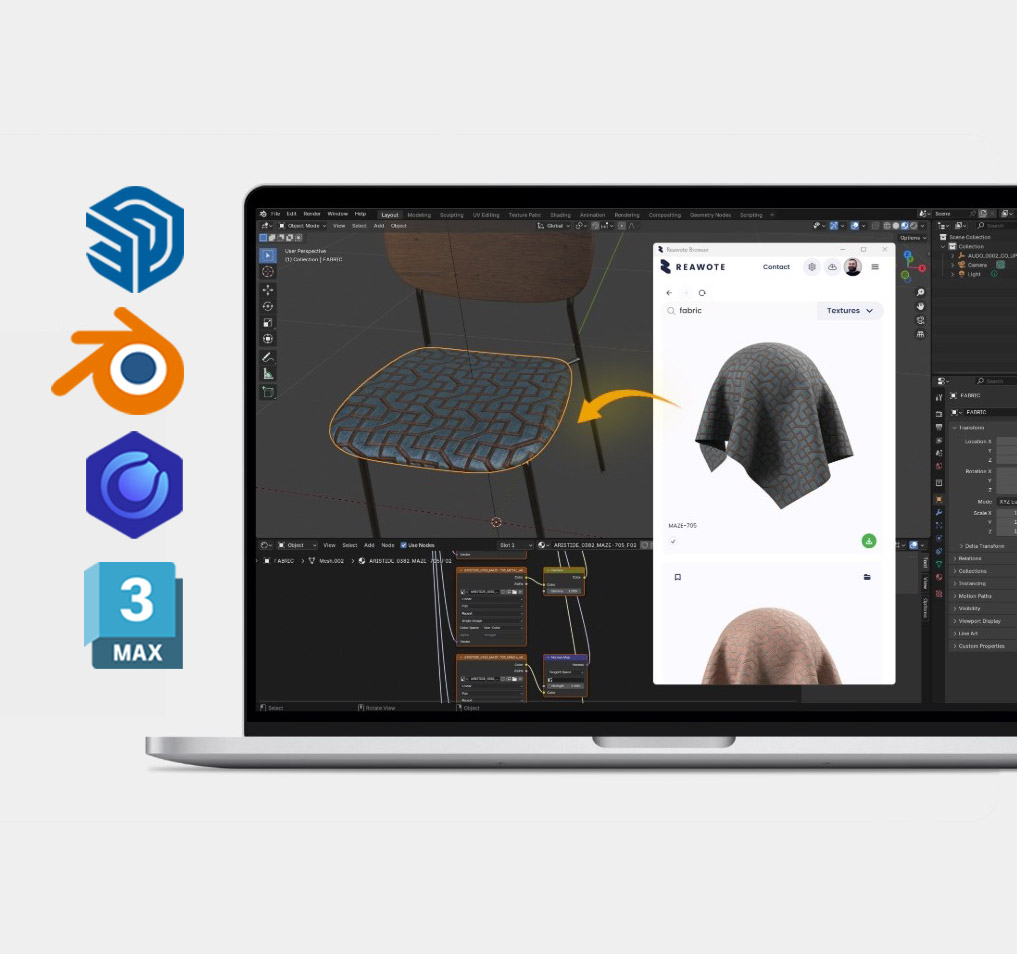
You can browse Reawote assets directly inside your 3D software and import selected models into the active scene without switching between browser tabs, folders and import dialogs. The asset library becomes part of the working environment, not a separate destination.
For anyone building architectural visualizations, interiors, product scenes or concept studies, this makes a real difference. You stay inside the scene, stay focused on the design and keep building without interrupting your flow.
Download, installation and compatibility
The new Reawote Browsers are available for download here.
Using the link above, you can choose your 3D software, watch the installation video, and view the tutorial explaining how to install and use the browser within the selected software.
Reawote Browser is compatible with the following 3D software and render engine combinations: Cinema 4D with Redshift, Corona and V-Ray; 3ds Max with Corona and V-Ray; SketchUp with V-Ray; and Blender.
If you are missing a specific combination or would like to suggest a new one, please use the Submit Feedback button in the 3D software detail section.
Click, import and keep designing
The new browsers are designed to feel like a natural extension of the software you already use.
Whether you work in Blender, SketchUp, Cinema 4D or 3ds Max, you can search and browse Reawote assets directly from within your workspace. Once you find the right 3D model, you can import it into the scene with a simple action and start using it immediately.
Assets are prepared to work smoothly in the target application, so there is no need to spend time on unnecessary manual setup before you can evaluate them in context. Instead of downloading, locating, importing and fixing files, you can move from selection to placement much more quickly.
This is especially useful during early design stages, when speed matters and many options need to be tested. Trying different furniture pieces, accessories, materials or product variants becomes a natural part of the creative process rather than a file-management task.
Built for real-world 3D workflows
In visualization work, small interruptions add up quickly. Switching between a website, a download folder, a file browser and a 3D application may seem minor once. But across a full project, with dozens or hundreds of assets, it becomes a serious drag on productivity.
Asset browsers remove much of that friction by keeping asset selection and scene building in one place.
This allows users to iterate faster, compare alternatives more easily and stay focused on the visual result instead of the mechanics of importing files. For experienced users, this can significantly accelerate the workflow because the creative decision and the technical action happen almost at the same time.
You find the asset, bring it into the scene and continue designing.
One library, multiple tools
The new asset browsers also make the Reawote experience more consistent across different 3D applications.
Whether your main tool is Blender, SketchUp, Cinema 4D or 3ds Max, you get access to the same high-quality Reawote library directly inside your software of choice. This is especially useful for studios and teams where different people use different tools but need to work from the same product and material base.
A designer may work in SketchUp, a visualizer in 3ds Max, another artist in Blender or Cinema 4D. With integrated asset browsers, they can all access the same source of Reawote assets without building separate local libraries or relying on inconsistent file-sharing workflows.
The library stays unified. The tools can stay flexible.
Designed to scale with your projects
As projects grow, asset management becomes more important. A small scene may only need a few models. A full interior, showroom, residential development or product campaign can involve dozens or hundreds of objects, materials and variants.
The new asset browsers are designed to support that scale.
Combined with Reawote features such as advanced library navigation, Collections, Bookmarks and centralized asset management, the browsers make it easier to find, organize and reuse assets across projects. Reawote becomes more than a download source. It becomes an integrated part of the 3D production pipeline.
This matters not only for individual artists, but also for teams that need consistency, speed and reliable access to approved assets across multiple projects.
Start building, not importing
The new asset browsers are a major step toward a faster and more seamless way of working with digital materials and 3D models.
Less downloading. Less searching through folders. Less manual importing. More designing.
With Reawote now integrated directly into Blender, SketchUp, Cinema 4D and 3ds Max, you can browse the library, bring assets into your scene and keep working without breaking your creative flow.
Download Reawote Browser and start creating now.
✍️ Key takeaways
📌 for 3DsMax with V-ray or Corona
📌 for Cinema4D with Redshift, V-ray or Corona
📌 for Sketchup with V-ray
📌 for Blender
Related posts
Join our community and stay updated on all things 3D
Sign up to our newsletter.


Build a better world with real-world 3D detail
Step into the digital world and explore new ways to create, present, and distribute products — without limits or physical constraints.